| assets | ||
| comparison | ||
| .gitignore | ||
| block_FB.sh | ||
| blocked | ||
| get_blocklists.sh | ||
| LICENSE | ||
| Links.txt | ||
| pull.lists.sh | ||
| readme.md | ||
| update.pi.sh | ||
| whitelist | ||

Pihole Lists Manager
If you find this repo useful please consider giving it a star ⭐️ on gitlab.

About the project
This repository contains scripts, blocklists and whitelists I use to manage the gravity database on my pihole instances.
The script pull.lists.sh fetches public blocklists and aggregates them with my personal blocklist. Finally the blocklists are compressed (xz) and are ready to be used.
The compressed blocklists save time & data spent in getting the blocklists over slow internet connections or while deploying to several machines. This results in files that is somewhere between 11-25% of their original size.
The script update.pi.sh is run on the pihole instances (raspberrypi, pc, docker), and it fetches the compressed blocklists and my whitelist. The script adds my whitelisted domains to pihole and updates gravity on pihole using pihole -g.
Note:
-
This script uses
sdandrgas replacement forsedandgrep. These time-tested utilities although very reliable are slower compared to their new age counterparts. If you have systems where they are not available, then you can edit the relevant lines in thepull.lists.shto usesedandgrep. -
Currently
update.pi.shhas this repo as upstream, but it can be changed to some other location, even locally if you’re running pihole on the same device.
How to use:
Run the following lines to update your blocklists:
./pull.lists.sh
# ensure everything is looking good
# commit to git
git add -u ; git commit -m "Update `date +'%Y-%m-%d'`" ; git push
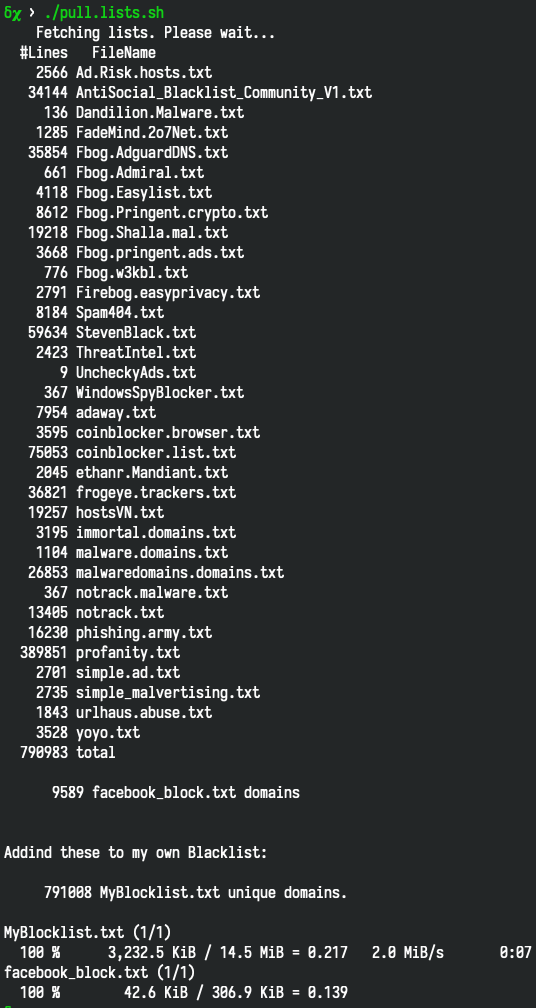
Then updating your pihole instances is as simple as running the included update.pi.sh script on your pihole from your git repo:
curl -L "https://gitlab.com/robocopAlpha/pihole_lists/-/raw/master/update.pi.sh" | bash

# To make it even easier
# just add this to your ~/.bashrc or ~/.zshrc
alias update.pi='curl -L "https://gitlab.com/robocopAlpha/pihole_lists/-/raw/master/update.pi.sh" | bash'

# Command to easily add the alias is included in the update.pi.sh
Adding as a cron job
You can add the update.pi script as a cron job to let the updates happen on a set time automatically by running (requires sudo rights):
sudo -s
curl -L "https://gitlab.com/robocopAlpha/pihole_lists/-/raw/master/update.pi.sh" >| /usr/local/bin/updatepi
chmod +x /usr/local/bin/updatepi
echo '5 18 * * *   root     PATH="$PATH:/usr/sbin:/usr/local/bin/" updatepi' >| /etc/cron.d/updatepi
exit
Whitelisting / False Positive reports
The list sources are listed in the file get_blocklists.sh, you can report issues to them directly to fix it. I can only give you “hot fixes”, which address the issue but doesn’t actually fix it.